Command Panel
Find an open tab, a saved link, or a recently visited page from one panel. Press Cmd Ctrl K, type what you need, and press Return to open the result or switch to its existing browser tab.
In All search results, a new Recommended section brings together up to five of the strongest matches from Live Tabs, saved links, and recent visits. It does not guarantee one result from each section, and pages shown here are not repeated below. The remaining results appear in labeled groups such as Live tabs, Pinned, Saved, Recently visited, and Settings. Browser logos beside the status labels and recent visit times help you tell similar pages apart. Visit times also appear on unselected open tabs and refresh while the panel is open. A page can be both saved and open, with both states shown on its row.
The footer shows where the selected result will open. Use Opt Return to choose another browser or profile, Ctrl Return to Ask AI, or Cmd Return to search the web.
Open Command Panel
Press Cmd Ctrl K from anywhere. You can also enable Cmd T while a browser is active in Preferences - Command Panel to open the Command Panel from inside any browser without changing your global shortcut. Other apps continue to receive Cmd T normally, and SupaSidebar skips this binding if your global shortcut is already Cmd T.
In the compact sidebar, the top bar has a magnifying-glass button that opens the Command Panel with one click, so you don’t have to reach for a keyboard shortcut when the compact sidebar is already in front of you.
| Shortcut | Action |
|---|---|
Cmd Ctrl K | Open panel |
Up Down | Navigate results |
Return | Open the selected result or switch to its open tab |
Opt Return | Open With: choose a browser or profile, or another item action |
Tab / Shift Tab | Next / previous scope in the scope bar |
/ | Open the scope picker |
Opt Tab | Expand or collapse web suggestions |
Ctrl Return | Ask AI |
Cmd Return | Search the web directly |
Escape | Close panel |
What you can search
- Saved Links - All your saved websites, files, and folders, from every Space rather than only the one you’re currently in
- Recent Items - Recent visits and imported browser history from the last 30 days, including eligible visits made while SupaSidebar was closed. See Recent Links for supported browsers and privacy controls.
- Live Tabs - Currently open browser tabs
- Folders - Browse and search inside folders
- Settings - Toggle preferences and run commands
- Web Search - Search the web with your preferred engine
Search scopes
Use All, Live tabs, Saved, or Recent in the scope bar to focus your results. Website icons in the same bar let you browse pages from a particular site. Press Tab or Shift Tab to move through the bar without using the mouse.
For more scopes, type / to open the picker, then part of a scope name or website keyword. Press Space or Return to select the match. Selecting a website preserves your existing search query; closing the picker with Escape restores your previous search.
| Scope | Icon | Activation keywords |
|---|---|---|
| All | Grid | (default) |
| Recents | Clock | ”recents”, “recent” |
| Live Tabs | Globe | ”live tabs”, “tabs” |
| Saved | Tray | ”saved” |
| Spaces | Stack | ”spaces”, “space” |
| Folders | Folder | ”folders”, “folder” |
| Settings | Gear | ”settings”, “tools”, “commands”, “actions” |
The Recents, Saved, Spaces, Folders, and Settings scopes show items even with an empty search query, so you can browse without typing. Switch to Recents to flip through pages you’ve visited recently, or to Saved to skim everything you’ve added to the sidebar.
Saved-link search spans every Space, not just the one you’re currently in. You can find a link you filed in any Space without switching to it first, so you never have to remember where you put something to get back to it.
Resume your search
Reopen the Command Panel within 60 seconds to return to the same scope, query, selected result, and scroll position. After 60 seconds, it opens a fresh session in All.
When browsing Live Tabs without a query, existing tabs keep their positions while the panel is open. New tabs are added and closed tabs disappear. Reopening the panel refreshes the browsing order; typed searches continue to sort by relevance.
A thin progress bar below the search field shows when the local search index is updating.
Site search shortcuts
Choose a website icon, or type / and part of its name or keyword, then press Space or Return. For example, /gh selects GitHub and /yo selects YouTube from the picker.
A website scope shows matching live tabs, saved links, and recent visits from that site, even before you type a query. Type to narrow those pages or use the website search action to find something new. Clearing the query keeps the website selected. Choose All to return to all results.
This works across website scopes, not only YouTube. See Search Shortcuts to add and arrange your own sites.
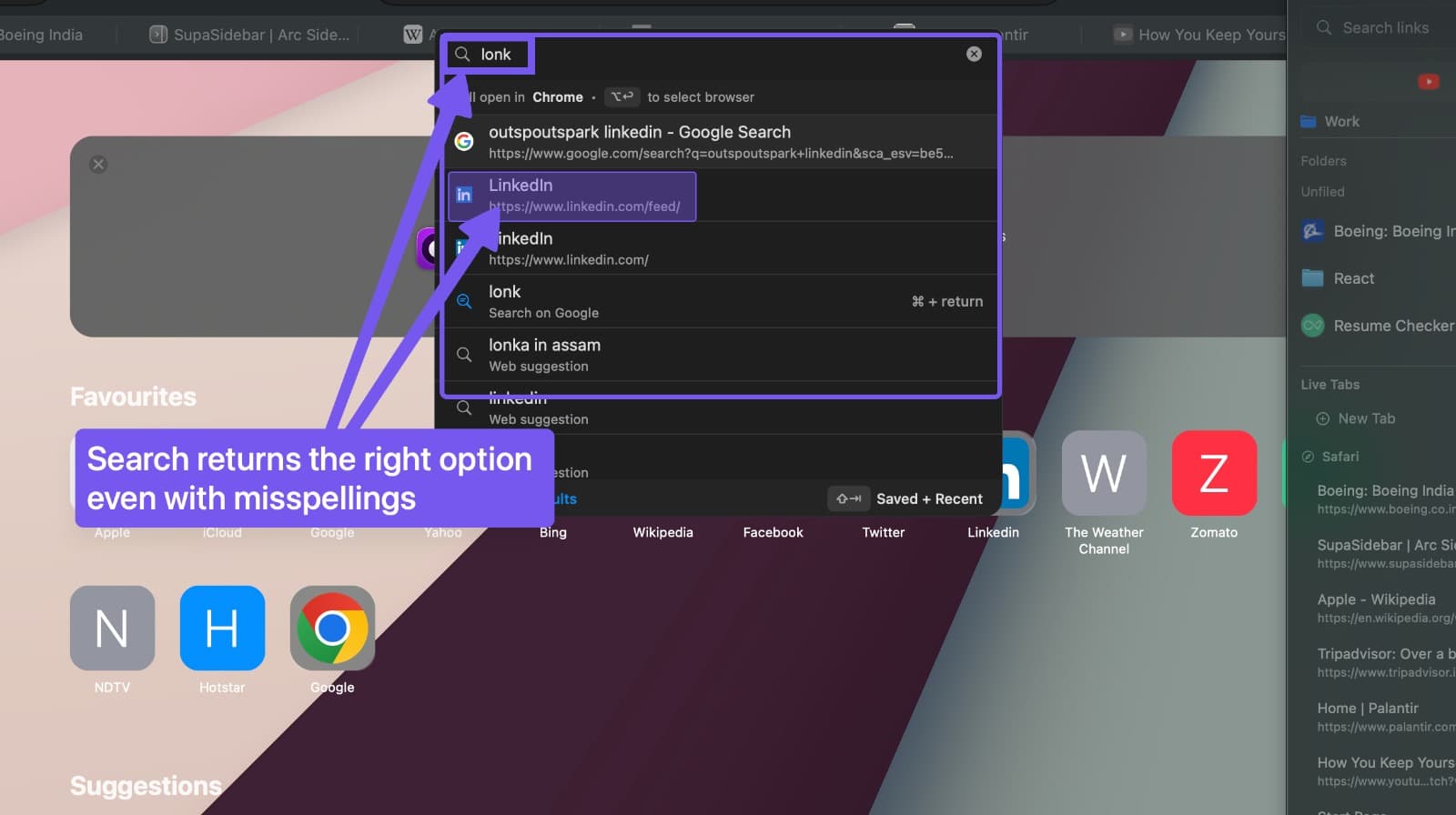
Fuzzy search
The search is forgiving and intelligent:
- “fecebook” finds “Facebook”
- “gh” finds “GitHub”
- “sup doc” finds “SupaSidebar Documentation”
Search history
The Command Panel remembers your past search queries. When you start typing, matching previous queries appear as suggestions, helping you quickly repeat frequent searches.
Manage suggestions
Open the item options menu (the ⋯ button on a result row) to clean up what shows up in the Command Panel:
- Remove from suggestions - Drops an old search query or recent link from future suggestions
- Delete saved link - Removes a saved link from your sidebar
- Reset ranking - Clears the item’s learned query choices and usage ranking signals
Remembered choices
Explicitly opening a matching result can help it rank for the same or a closely related query later. Highlighting a row does not teach a choice. In Recent, visit time still decides the order within each match-quality group. Incognito Mode pauses query-choice learning.
Frequent items
Open the panel with an empty query to browse useful pages in their result groups. Frequently opened saved links receive a ranking boost for short queries, helping you get back to them with less typing.
Actions panel
Press Opt Return on any selected item to see available actions:
Open With ranks your browser and profile choices by use. Press a displayed number key (1 through 9) to choose a destination, or use the arrow keys and Return. The footer’s destination hint follows the same browser routing used when you open a result.
| Action | When available |
|---|---|
| Copy URL | Always |
| Reveal in Sidebar | Saved links |
| Add note | Saved links - opens the note editor for the selected link |
| Save to Sidebar | Unsaved items (uses your search query) |
| Reveal in Finder | Local file and folder links |
| Open in [Browser] | One entry per installed browser |
Press Escape to dismiss the actions panel and return to search results.
Choose which browser rules apply
Preferences → Command Panel → Use current Space rules is on by default. It lets the current Space contribute its browser connection and Space-specific Air Traffic Control rules when you open a link from the Command Panel.
Turn it off to use only Air Traffic Control rules for all Spaces and your default browser routing. Explicit Open With choices still take precedence. This setting affects Command Panel opening; it does not change sidebar routing or remove any saved rules.
Domain autocomplete
Typing a partial host like lo completes to localhost:3000 instead of dropping the port. Domain suggestions preserve the original port, path, and casing of the link they came from.
Clipboard awareness
When you open the Command Panel with a URL on your clipboard, a “Paste and Go” row appears at the top of the results. Press Return to open the URL directly.
Toggle settings
Search for a preference in All, or type /settings and press Return to use the Settings scope. Select a result to open the matching setting; supported actions can toggle a preference directly. Try “Permission Status”, “Privacy & Browsers”, “Automation”, “Accessibility”, or “learning tips”. You can also search inside Preferences.
Useful entries to know about:
- Dark / Light / Theme - Flips between Light and Dark mode. Search for
dark,light,theme, orappearanceto find it. - Incognito Mode - Pauses Recents, history imports, search history, and ranking signals while enabled. See Incognito Mode.
- Auto-Tile Windows - Toggles auto-tiling on and off. See Tiling.
Air Traffic Control suggestions
When the URL you’re about to open matches a strong pattern (you’ve consistently opened the same domain in the same browser, for example), the Command Panel shows a one-click row that creates an Air Traffic Control open route and opens the link in the suggested browser at the same time. You can decline the suggestion and just open the link as usual.
Control these prompts in Preferences → Air Traffic Control using Show Route Suggestions.
Draggable positioning
Drag the Command Panel anywhere on screen. It magnetically snaps to center with visual guide lines when you drag near the default position. Release near center to reset, or drop anywhere else to save that position across sessions.
The Command Panel uses a frosted glass design that blends with your desktop while keeping content readable.
Live tab switching
Search for an open tab by title and press Return to switch instantly.
Ask AI
Press Ctrl Return to chat with an AI assistant inside the Command Panel. Search your sidebar, open links, create folders, and more using natural language. See Ask AI for details.
AI assistant integration
SupaSidebar can also be controlled by AI assistants via the Model Context Protocol (MCP). Search your sidebar, switch spaces, and open links hands-free. See SupaSidebar MCP for setup.
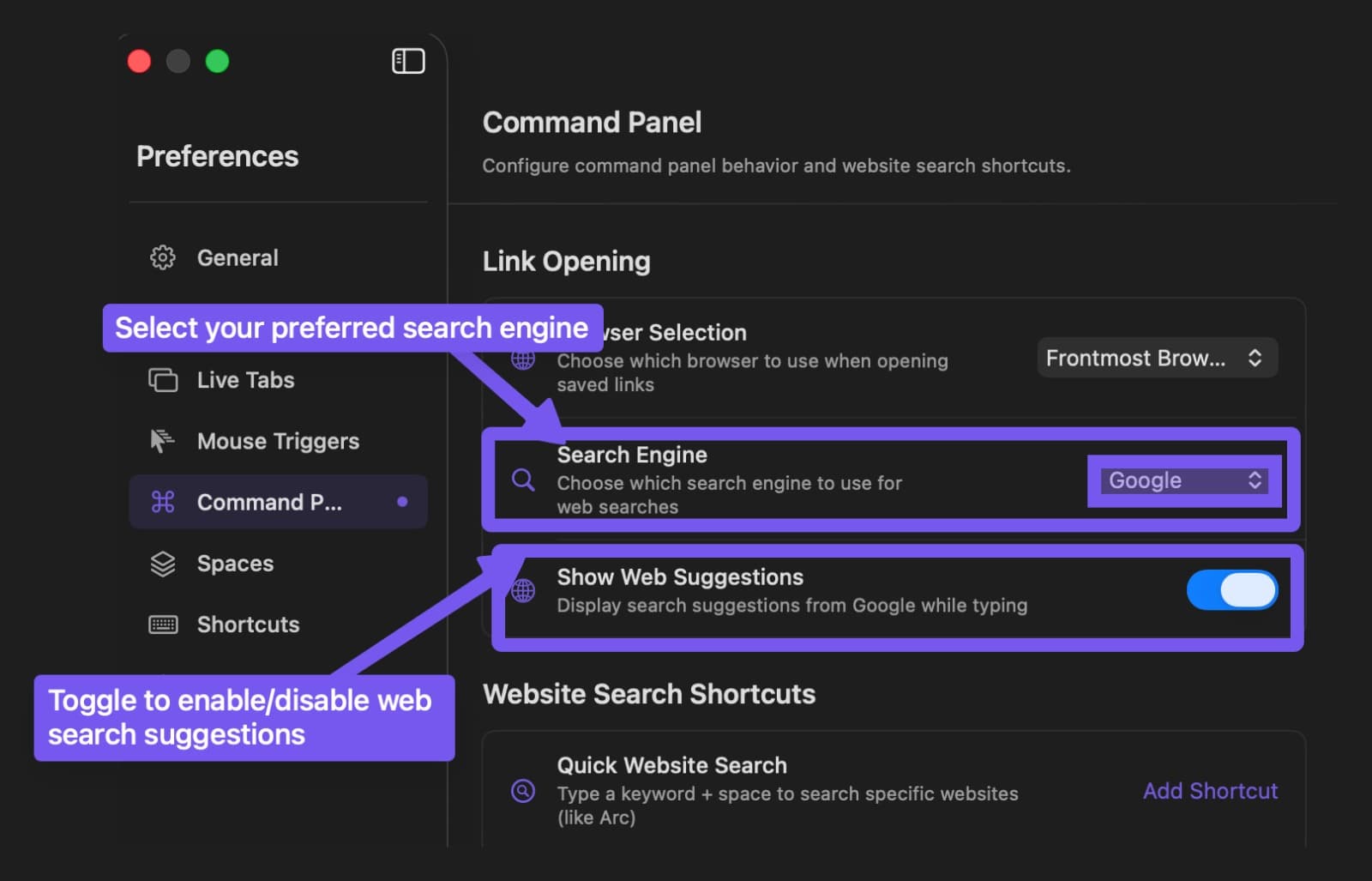
Web search
- Open Preferences - Command Panel
- Enable Web search suggestions
- Choose your engine (Google, DuckDuckGo, Bing, Yahoo, Perplexity)
Press Cmd Return to search the web directly with your current query.
Web suggestions sit in a separate expandable section below your local results. They open automatically when there is room. Click Web suggestions or press Opt Tab to expand or collapse the section yourself.
Tips
- Use
TabandShift Tabto move between the visible scopes, or/to find one by name. - The Settings scope lets you toggle preferences without leaving what you’re doing.
- Drag the panel to a comfortable position - it remembers where you left it.
- See Shortcuts for the complete keyboard shortcut reference.