Live Tabs
Real-time mirror of your browser tabs directly in the sidebar - switch between tabs across all browsers without leaving your keyboard.
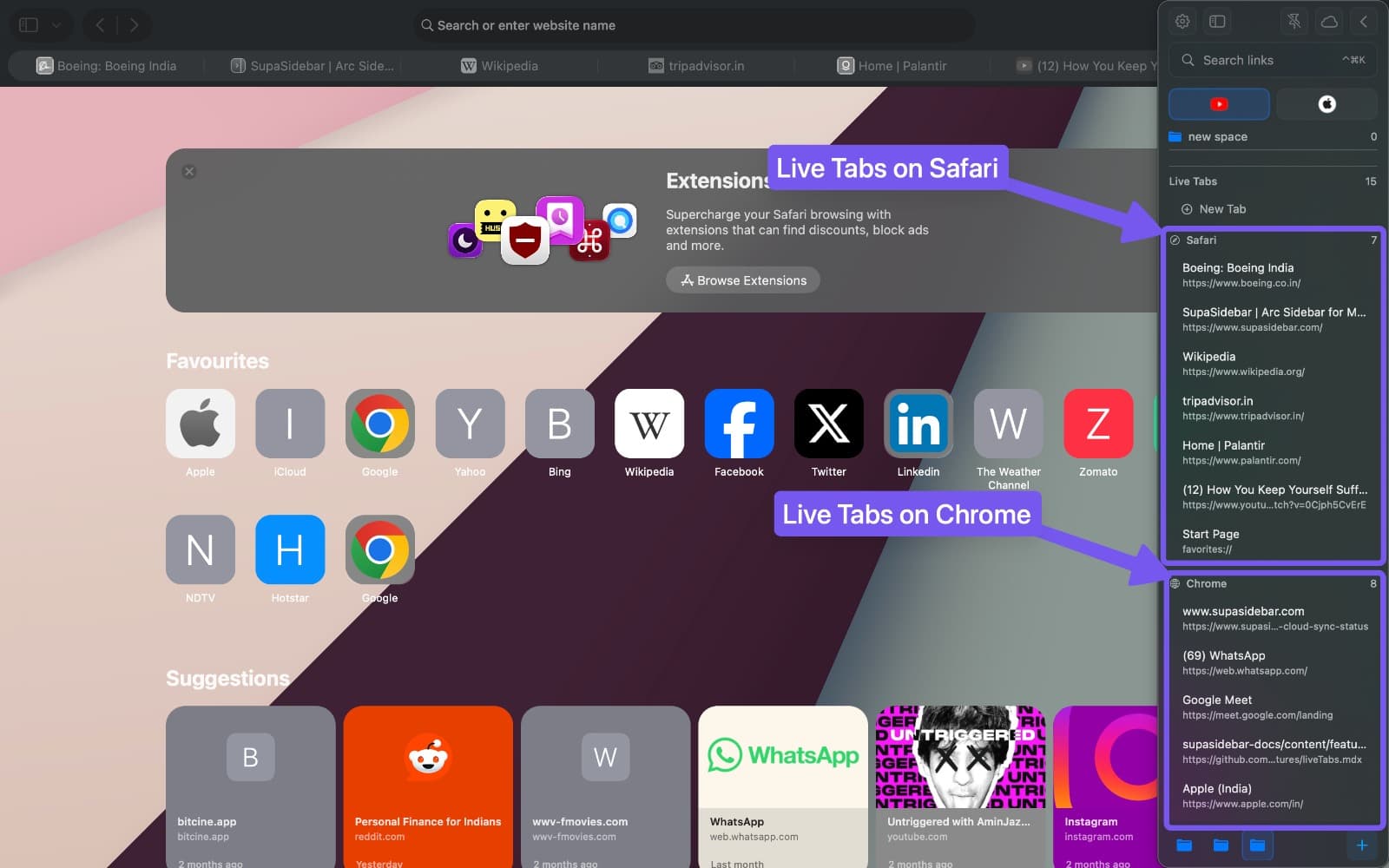
Live Tabs gives you a single bird’s-eye view of every open tab across every browser on your Mac. Safari (including Safari Technology Preview), Chrome, Firefox, Edge, Brave, Vivaldi, DuckDuckGo, and 20+ other browsers all appear in one collapsible list in the SupaSidebar panel, so you can search, switch to, close, or save any tab from any browser without alt-tabbing through windows. Right-click any tab to send or move it to a different browser or profile, so a link you opened in the wrong app is one menu away from the right one. When a SupaSidebar space is linked to a browser profile, the list filters to only that profile’s tabs, so work and personal sessions stay siloed.
Setup
- Open Preferences - Browser Activity
- Choose your mode using the card selector: Live Tabs, Recents, or None
- Grant browser permissions when prompted
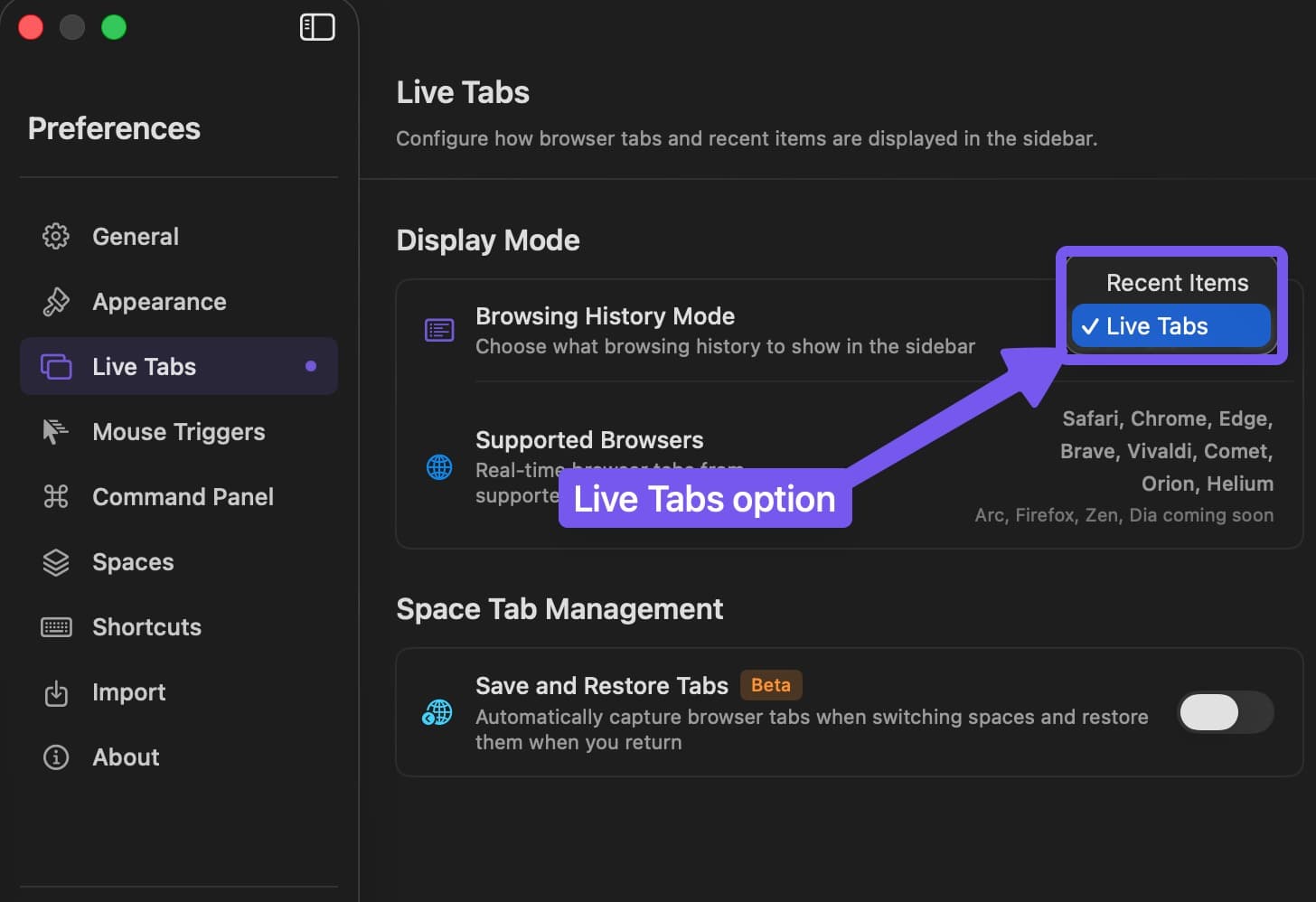
Choose which browsers contribute tabs in Preferences → Privacy & Browsers using each browser’s Live Tabs checkbox. For permission setup or Permission Status, see the Permissions Guide.
Supported browsers
SupaSidebar supports Live Tabs across 20+ browsers. Each installed browser shows its real app icon in the sidebar.
| Status | Browsers |
|---|---|
| Fully Supported | Safari (incl. Safari Technology Preview), Chrome, Edge, Brave (incl. Brave Origin), Vivaldi, Comet, Orion, Helium, Dia, DuckDuckGo, Norton Private Browser, Firefox (stable, Nightly, Developer Edition), LibreWolf, and additional Chromium-based variants |
| In Development | Atlas, Arc |
See Browser Support for the full compatibility table.
Collapsible browser sections
Each browser appears as a collapsible section in the Live Tabs list. Click the browser header to expand or collapse its tabs. This keeps the list manageable when you have tabs open across multiple browsers.
Browser window groups
When a browser has multiple windows, its tabs appear under separate window headers. Click a header to collapse or expand that window’s tabs.
Double-click a window name, or right-click its header and choose Rename Window…, to give it a label such as Work or Research. Use Reset Name to restore the original label. Window names apply to the current session and are not kept after SupaSidebar relaunches.
View-mode switch
The Live Tabs section header has a small toggle that switches the list between compact and detailed views. Compact shows favicon and title on one line, detailed adds the URL and extra hover icons. The same toggle is also available on the Recent Links header, and the choice is remembered per section.
Per-URL colors
Assign a custom color to specific URLs so your live tabs are easier to scan. Right-click a live tab and choose Color to pick a tint that follows that URL across every browser and window. Colors are matched against the URL, so the same site keeps the same color whether it’s open in Chrome, Safari, or Brave.
To remove a color, right-click the tab and choose Clear Color. URL colors persist across sessions and sync via iCloud.
Switch to Tab
Search for an open tab by title in the Command Panel or click it in the Live Tabs list to switch to it instantly. SupaSidebar activates the existing tab in the correct browser window.
Duplicate tabs are automatically deduplicated in the list, so you see each unique page only once.
Right-click actions
Right-click any live tab to manage it directly from the sidebar. Works in both expanded mode and compact mode.
| Action | What it does |
|---|---|
| Activate Tab | Switches your browser to that tab (the same as single-clicking) |
| Open With > Browser | Sends the tab’s URL to a different browser. Choose a specific Chrome, Safari, or Vivaldi profile when the picked browser has profiles |
| Move to Browser | Reopens the tab in another browser and closes the original, so the tab moves instead of being copied |
| Close Tab | Closes the tab |
| Close Other Tabs in Window / Browser | Bulk-close by window or by browser - see Bulk Closing Tabs |
| Close Tabs Above / Below | Closes tabs above or below this one in the strip - see Bulk Closing Tabs |
| Save Tab / Save Other Tabs | Saves selected tabs to your sidebar in one go |
Open With copies the tab’s URL to the new browser and leaves the original open, so the page ends up in two places. Move to Browser does the opposite: it reopens the tab elsewhere and closes the original, a true move rather than a copy. Use Open With when you opened a link in the wrong browser (or wrong profile) and want it in another without re-typing the URL; use Move to Browser when you also want it gone from the first browser.
Select multiple Live Tabs
In the expanded sidebar, right-click a Live Tab and choose Select. Click other rows to add them to the selection, then use Actions to copy their URLs or create a folder from them. Click Done or press Escape to leave selection mode. See Sidebar selection.
Drag and drop
Drag tabs from the Live Tabs list to save them anywhere in your sidebar:
- To Pinned Tabs - Drop onto the pinned section to pin a tab for quick access
- To folders - Drop into any folder to save and organize
- To spaces - Drop into a space to save at the root level
You can also drag from Recent Items into Pinned Tabs or saved links the same way.
Active tab highlight
The currently open tab is visually highlighted in the Live Tabs list, making it easy to spot where you are across multiple browsers.
Privacy and filtering
Use Preferences → Privacy & Browsers to disable Live Tabs for a browser, block a browser, or add website rules. Per-browser Private Mode and global Incognito pause recording while keeping Live Tabs available. See Privacy & Browsers.
Smart Tab Reuse
When you click a saved link that’s already open in a browser tab, SupaSidebar activates the existing tab instead of opening a duplicate. Tracking parameters (utm_*, gclid, fbclid) are ignored when matching URLs, so a link will still match its open tab even if the saved URL has different tracking params.
Pinned tabs also support Cmd Opt Click to replace the active browser tab in place, with a normal-open fallback if the browser can’t swap tabs.
If a link opens a new tab instead of switching to the existing one, see Link Opens New Tab Instead of Switching.
Profile filtering
In 1.3.0 and later, link a browser or profile using the link icon next to the space name, or while creating a space. Manage connections in Preferences → Spaces → My spaces. Using 1.2.x?
When a space is linked to a browser profile, Live Tabs automatically filters to show only tabs from that profile. Tabs from other profiles are hidden.
A whole-browser link shows tabs from that browser. Spaces without a connection show tabs from all enabled, supported browsers. Linking does not turn on tab closing.
Browser/profile switching settings are in Preferences → Spaces → Switching spaces. The optional legacy Close and reopen tabs on space change control is under Advanced there. Live Tabs display settings remain in Preferences → Browser Activity.
See Link a browser or profile for the full flow.
Frequently asked questions
Can I send an open tab from one browser to another on macOS?
Yes. Right-click any tab in the Live Tabs list and choose Open With to send its URL to a different browser, or Move to Browser to reopen it elsewhere and close the original (a true move rather than a copy). If the destination browser has profiles (Chrome, Safari, Vivaldi, Edge, Brave), you can pick a specific profile so the tab opens in the right session. The Live Tabs list spans every installed browser, so the source and destination can be any combination across Safari, Chrome, Firefox, Edge, Brave, Vivaldi, DuckDuckGo, and 20+ others.
Does Live Tabs work with Safari Technology Preview and DuckDuckGo?
Yes. Both browsers are fully supported alongside regular Safari, Chrome, Firefox, and the rest. Their tabs appear in the same Live Tabs list with their real app icons, and right-click actions including Open With and Save Tab work the same way.
How do I see every open tab across every browser at once?
Open the SupaSidebar panel. The Live Tabs section shows one collapsible list per browser, with every open tab in every window across every installed browser on your Mac. Fuzzy-search by title in the Command Panel to jump straight to a tab without scrolling.
Keyboard shortcuts
Shortcuts specific to Live Tabs. For all shortcuts, see Shortcuts.
| Shortcut | Action |
|---|---|
Cmd Ctrl K | Open Command Panel (search tabs from there) |
Up Down | Navigate tabs |
Return | Switch to tab |