Sidebar appears automatically when you open a browser
Problem
The sidebar shows up on screen by itself. Every time you focus or open a browser window, the SupaSidebar panel slides in without you pressing a shortcut or clicking anything.
Cause
This is Auto-show with Browser doing its job. When the setting is on, the sidebar automatically appears whenever a browser becomes the active app, so your links and tabs are ready the moment you start browsing.
If you would rather open the sidebar only when you ask for it (a keyboard shortcut, the menu bar icon, or a mouse trigger), turn this setting off.
Solution
You can turn it off from the sidebar menu or from Preferences.
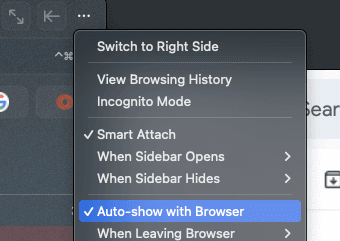
From the sidebar menu
- Open the sidebar and click the … button in the top toolbar.
- Uncheck Auto-show with Browser.
From Preferences
- Open Preferences → Sidebar.
- Turn off Auto Show on Browser Focus.
Once it is off, the sidebar stays hidden until you open it yourself. Nothing else about your links, spaces, or Smart Attach layout changes.
Still want auto-show, just less often?
If you like the sidebar appearing with your browser but want it to get out of the way afterward, leave Auto-show with Browser on and set When Leaving Browser to Hide. The sidebar then appears with the browser and hides again the moment you switch to another app.
Learn more
- Sidebar Panel - All sidebar visibility settings
- Browser Integration - How the sidebar reacts to your browser
- Mouse Triggers - Open the sidebar by hovering a screen edge instead
- Keyboard shortcuts - Open the sidebar on demand